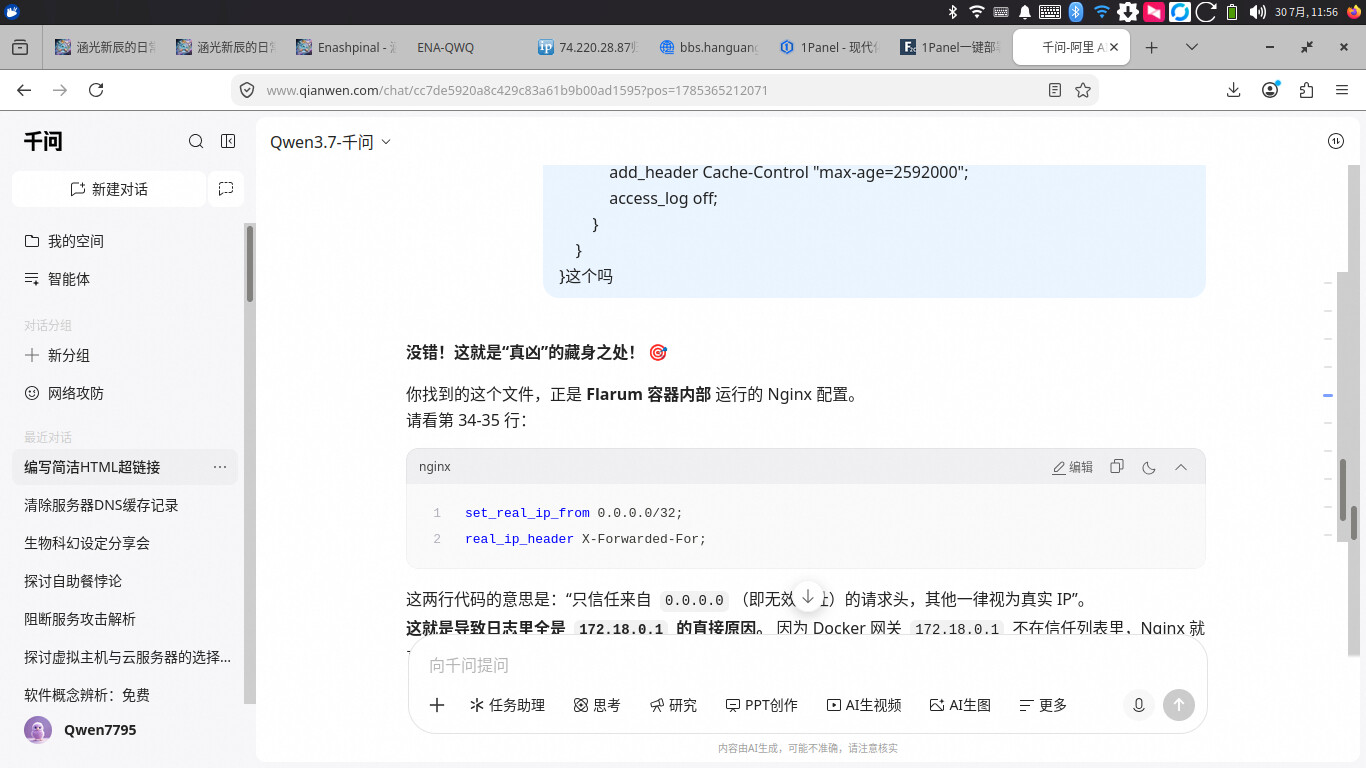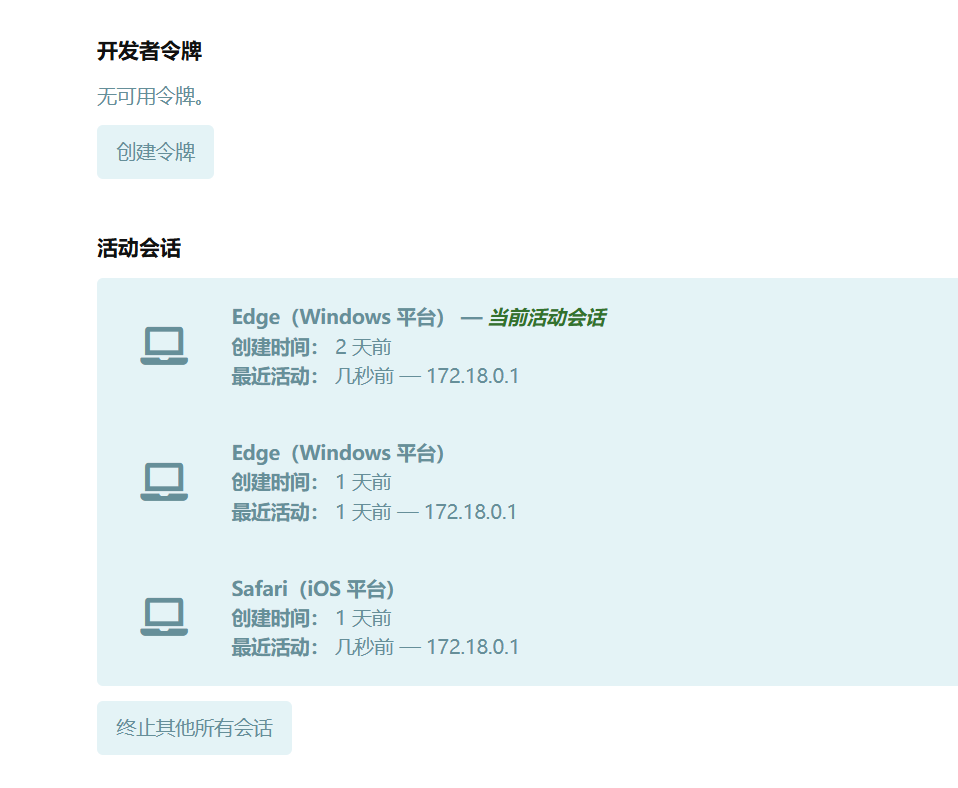
现在这显示的是docker内网的IP对吧?那要怎么修改呢
在导出搜索,都没搜到答案 
1Panel 采用 Docker 容器化部署。关于应用安装后的具体使用问题,建议查阅应用的官方教程。
我昨天也遇到了同样的问题。经过与ai的共同分析,其实是容器内Nginx的配置问题。
编辑文件:在 1Panel 的文件管理或终端中打开这个配置文件:/etc/nginx/nginx.conf
定位代码:找到 http 块下的 set_real_ip_from。
替换内容:将原来的两行删掉或注释掉,改为以下内容:
# 信任所有私有网络地址(包括 Docker 网关 172.x.x.x 和 10.x.x.x)
set_real_ip_from 10.0.0.0/8;
set_real_ip_from 172.16.0.0/12;
set_real_ip_from 192.168.0.0/16;

# 告诉 Nginx 从哪个头里获取真实 IP
real_ip_header X-Forwarded-For;
当然,完整的配置文件也可以给你,以便便捷地挂载和替换
pid /var/run/nginx/nginx.pid;
worker_processes auto;
error_log /proc/self/fd/2 info;

events {
    worker_connections 2048;
    use epoll;
    multi_accept on;
}

http {
    include mime.types;
    default_type application/octet-stream;

    aio threads;
    sendfile on;
    large_client_header_buffers 4 16k;

    ## Timeouts
    client_body_timeout   60;
    client_header_timeout 60;
    keepalive_timeout     10 10;
    send_timeout          60;

    ## TCP options
    tcp_nopush  on;
    tcp_nodelay on;

    ## Temp folders
    client_body_temp_path /tmp/nginx 1 2;
    proxy_temp_path /tmp/nginx-proxy;
    fastcgi_temp_path /tmp/nginx-fastcgi;
    uwsgi_temp_path /tmp/nginx-uwsgi;
    scgi_temp_path /tmp/nginx-scgi;

    ## 【核心修改】处理 IP 信任问题
    # 信任 Docker 网段和私有网络
    set_real_ip_from 10.0.0.0/8;
    set_real_ip_from 172.16.0.0/12;
    set_real_ip_from 192.168.0.0/16;

    # 从 X-Forwarded-For 头中提取真实 IP
    real_ip_header X-Forwarded-For;
    # 递归查找,防止多层代理
    real_ip_recursive on;

    # Log
    log_format main '$remote_addr - $remote_user [$time_local] '
        '"$request" $status $body_bytes_sent '
        '"$http_referer" "$http_user_agent"';
    access_log /proc/self/fd/1 main;

    ## Hide the Nginx version number
    server_tokens off;

    ## Body size
    client_max_body_size 256M;
    client_body_buffer_size 128k;

    ## Compression
    gzip on;
    gzip_comp_level 5;
    gzip_min_length 256;
    gzip_proxied any;
    gzip_vary on;
    gzip_types
        application/atom+xml
        application/javascript
        application/json
        application/ld+json
        application/manifest+json
        application/rss+xml
        application/vnd.geo+json
        application/vnd.ms-fontobject
        application/x-font-ttf
        application/x-web-app-manifest+json
        application/xhtml+xml
        application/xml
        font/opentype
        image/bmp
        image/svg+xml
        image/x-icon
        text/cache-manifest
        text/css
        text/plain
        text/vcard
        text/vnd.rim.location.xloc
        text/vtt
        text/x-component
        text/x-cross-domain-policy;

    ## Serve already compressed files directly, bypassing on-the-fl y compression
    gzip_static on;

    server {
        listen 8000;
        listen [::]:8000;

        root /opt/flarum/public;
        index index.php;

        location / {
            try_files $uri $uri/ /index.php?$query_string;
        }

        location = /sitemap.xml {
            try_files $uri $uri/ /index.php?$query_string;
        }

        location ~ \.php$ {
            fastcgi_split_path_info ^(.+\.php)(/.*)$;
            set $path_info $fastcgi_path_info;
            try_files $fastcgi_script_name =404;
            include fastcgi_params;
            fastcgi_param SERVER_SOFTWARE "";
            fastcgi_param SCRIPT_FILENAME $document_root$fastcgi_script_name;
            fastcgi_param PATH_INFO $path_info;
            fastcgi_index index.php;
            fastcgi_pass unix:/var/run/php-fpm/php-fpm.sock;
            fastcgi_buffers 256 4k;
            fastcgi_intercept_errors on;
            fastcgi_read_timeout 14400;
        }

        location ~* \.(?:manifest|appcache|html?|xml|json)$ {
            add_header Cache-Control "max-age=0";
        }

        location ~* \.(?:rss|atom)$ {
            add_header Cache-Control "max-age=3600";
        }

        location ~* \.(?:jpg|jpeg|gif|png|ico|cur|gz|svg|mp4|ogg|ogv|webm|htc)$ {
            add_header Cache-Control "max-age=2592000";
            access_log off;
        }

        location ~* \.(?:css|js)$ {
            add_header Cache-Control "max-age=31536000";
            access_log off;
        }

        location ~* \.(?:ttf|ttc|otf|eot|woff|woff2)$ {
            add_header Cache-Control "max-age=2592000";
            access_log off;
        }
    }
}
我觉得官方能修复的话最好,毕竟只是改一下Nginx的默认配置,改docker-compose应该有办法的